Tutorial
AtmosphericTurbulenceSimulator provides a Julia toolchain to simulate atmospheric turbulence effects on imaging systems. The package:
- Generates turbulent phase screens following the Kolmogorov model
- Supports efficient high-resolution generation via Harding interpolation
- Simulates telescope imaging with various aperture functions
- Models different true-sky brightness distributions (point sources, binaries, extended objects)
- Outputs results to HDF5 format for analysis
- Supports CPU multi-threading and GPU acceleration (CUDA, etc.)
Installation
This package is not registered yet. You can install it with the following command in Julia's REPL:
using Pkg
Pkg.add(url="https://github.com/aryavorskiy/AtmosphericTurbulenceSimulator")
Basic usage
Phase screen generation
The atmosphere is modeled as a single turbulent layer with phase screens generated according to Kolmogorov statistics:
\[D_\phi(r) = \big\langle (\phi(x) - \phi(x+r))^2 \big\rangle = 6.88 \left( \frac{r}{r_0} \right)^{5/3}.\]
Here the Fried parameter $r_0$ (see Fried 1965) controls the turbulence strength. Typically, $r_0$ takes values from a few centimeters to tens of centimeters, depending on atmospheric conditions and wavelength; larger $r_0$ means weaker aberrations.
Thus, a single turbulent layer is specified by the grid size and the dimensionless Fried parameter in pixels. Use the SingleLayer constructor:
using AtmosphericTurbulenceSimulator
# Assume a 2 m telescope, r0 = 0.2 m, grid size 64×64
atm = SingleLayer((64, 64), 0.2 / 2 * 64)
# Using interpolation for 256×256 grid
atm_harding = SingleLayer((256, 256), 0.2 / 2 * 256; interpolate=:auto)
SingleLayer{Float64, 4}(AtmosphericTurbulenceSimulator.HardingSpec{4}((256, 256), (27, 27)), 25.6)Normally the phases are generated using Karhunen-Loève expansion by sampling from a multivariate normal distribution with the appropriate covariance matrix. Since this can be compute-intensive for grids larger than ~32×32, it is recommended to use Harding interpolation (see Harding et al. 1999) for high-resolution screens. One interpolation pass increases the grid size as $N \to 2N - 11$, so multiple passes can be used to reach very high resolutions efficiently. See the SingleLayer documentation for details on interpolation options.
You can generate and save phase screens to an HDF5 file using simulate_phases:
using Plots, HDF5
simulate_phases(atm_harding; n=128, filename="phases.h5")

# Load and visualize a generated phase screen
phases = h5read("phases.h5", "phases", (:, :, 1))
heatmap(phases, colorbar=true, colormap=:viridis, aspect_ratio=:equal, title="Turbulent Phase Screen", size=(500, 450))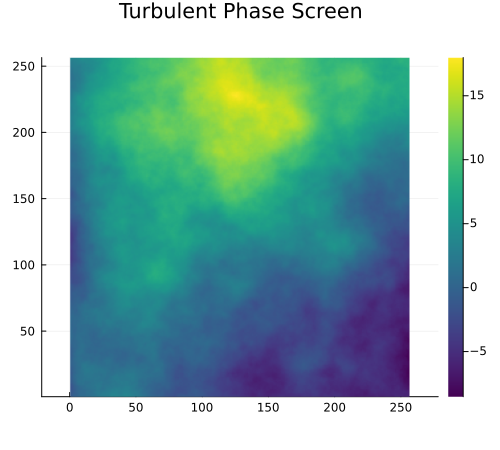
PSF simulation
To simulate images, you need to specify the imaging system (aperture, detector) and the true sky brightness distribution. The imaging pipeline convolves the PSF (computed from turbulent phase screens) with the true sky model, optionally adding photon shot noise.
The aperture function defines the telescope pupil. For a circular aperture with radius $R$ on an $N\times N$ grid:
using AtmosphericTurbulenceSimulator

# 64×64 grid, radius 30 pixels
aperture = CircularAperture((64, 64), 30)
img_spec = ImagingSpec(aperture, PhotonCount(1e7, 200), filter_spec=FilterSpec(550, bandwidth=40))
The ImagingSpec combines the aperture with detector parameters. The PhotonCount is used to define the photon budget, while the FilterSpec is used to define wavelength and bandpass. You can also specify the photon budget with the nphotons and background keywords.
Note that the Nyquist oversampling affects the PSF size, so it does not match the aperture grid size directly. You can specify the imaging grid size explicitly by passing it as a positional argument to ImagingSpec.
The non-monochromatic PSF simulation assumes the telescope itself is achromatic, i.e., the aperture function does not depend on wavelength. The wavelength dependence only enters through the Fried parameter $r_0(\lambda) \propto \lambda^{6/5}$ and the diffraction limit $\lambda / D$. This is a good approximation only for narrow bands.
For the true sky, use PointSource for a single point source, DoubleSystem for a binary, or TrueSkyImage for arbitrary extended objects:
# Point source
ts_point = PointSource()
# Binary system
ts_double = DoubleSystem((5, 3), 0.5)
# Custom image from array
img = zeros(Float32, 128, 128)
img[65, 65] = 1.0  # single bright pixel at center
for _ in 1:5
    # random companions around the center
    img[65 + rand(-32:32), 65 + rand(-32:32)] += rand() * 0.1 + 0.05
end
ts_image = TrueSkyImage(img)
Finally, combine everything with simulate_images to generate a sequence of turbulence-degraded images:
using Plots, HDF5, Statistics

# Atmosphere with same grid as aperture
atm = SingleLayer((64, 64), 0.2 / 2 * 64, interpolate=:auto)

# Simulate 128 images
simulate_images(Int32, img_spec, atm, ts_point; n=128, filename="images.h5")

# Load and visualize results
images = h5read("images.h5", "images")

p1 = heatmap(images[:, :, 1], title="Single Frame", colormap=:jet, aspect_ratio=:equal)
p2 = heatmap(mean(images, dims=3)[:,:,1], title="128 Frame Average", colormap=:jet, aspect_ratio=:equal)
plot(p1, p2, layout=(1, 2), size=(900, 450))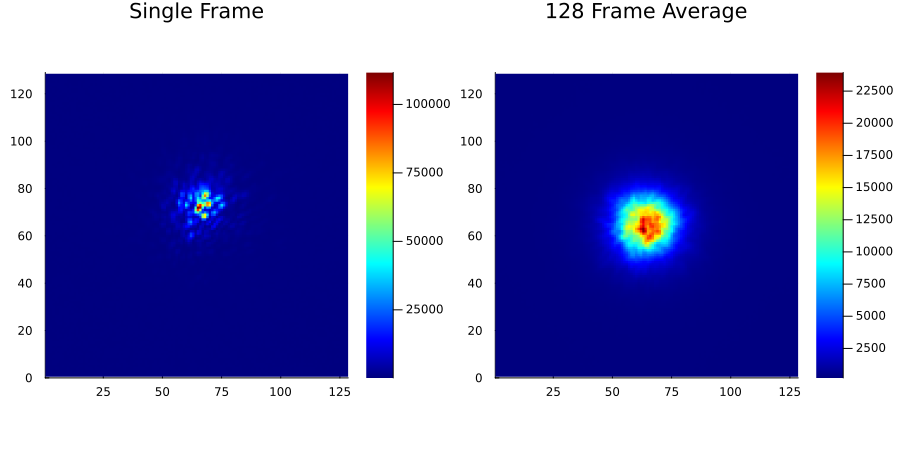
The output HDF5 file contains:
"images": simulated images $(N_x, N_y, n)$"aperture": the aperture function $(N_x, N_y)$"phases": phase screens $(Np_x, Np_y, n)$ (ifsavephases=true, true by default)
Advanced options
Batch size
Control batch size and HDF5 chunk size for better I/O performance:
simulate_images(img_spec, atm, ts; n=10000, batch=256, filename="simulation.h5")The default batch size is 64 images; this is reasonable for most use cases, increase if you have sufficient RAM and run in more than 64 threads or on GPU.
Multi-threading and GPU acceleration
When running large simulations, consider adding more CPU threads:
julia --threads=auto # use all available coresYou can also enable GPU acceleration by specifying a device adapter. For example, to run on an NVIDIA GPU using CUDA.jl:
using CUDA
# Set up atmosphere, imaging spec, true sky as before
simulate_images(img_spec, atm, ts; n=100_000, filename="simulation.h5", deviceadapter=CuArray) # run on GPUMemory considerations
For very large grids or long runs:
- Use Harding interpolation with
interpolate=:auto - Reduce batch size if running out of RAM
- Set
savephases=falseif phases aren't needed — this saves disk space